Free Sample

Apply Now

CN

×

keywords:

xxxx1 xxx2 xxx3 xx4 copy
Shenzhen Meiyad Optoelectronics Co., Ltd. Shenzhen Meiyad Optoelectronics Co., Ltd.

News

News

News

Meiyad

21|10|2026

Flexible Module: A Complete Guide to Flexible LED Display Modules

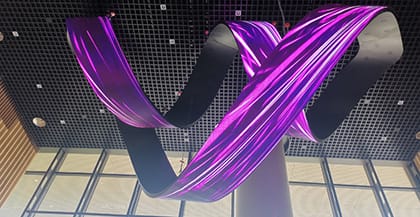
A flexible module is an essential component in modern LED display systems designed for curved surfaces, cylindrical structures, and creative display installations. Unlike conventional flat LED modules, a flexible LED module can adapt to different shapes, making it possible to create distinctive visual displays for retail spaces, exhibitions, entertainment venues, and architectural environments.For LED display integrators, project designers, and buyers, understanding how flexible modules work is the first step toward choosing the right display solution. Factors such as pixel pitch, module size, bending performance, mounting structure, and installation environment all influence the final result.In this guide, we explain what a flexible module is, how it works, its key features, common applications, and how to choose a suitable solution for your project.What Is a Flexible Module?A flexible module is an LED display module designed to adapt to curved or irregular surfaces rather than being limited to conventional flat installations. It allows multiple modules to be assembled into displays with customized shapes, including concave and convex curves, cylindrical screens, wave screens, ribbon screens and other creative structures.A flexible LED module consists of LED lamps, a printed circuit board (PCB), a silicone flexible bottom shell, and powerful magnets with adjustable height. The silicone bottom shell enables the module to adapt to curved display structures, while the magnetic mounting system allows the module to be securely attached to a compatible metal supporting structure. The adjustable-height magnets help accommodate installation requirements and maintain proper alignment.The primary difference between flexible and flat LED modules is their ability to accommodate curved installation structures. Flat modules are generally designed for flat mounting surfaces, while flexible LED modules are designed to support curved display configurations within their specified bending limits.How Is a Flexible Module Used in an LED Display?A complete flexible LED screen consists of flexible LED modules, a control system, a power supply system, cabinets and mounting structures, a signal transmission and connection system, and a heat dissipation system. Among these components, the flexible LED module forms the display surface and enables the screen to adapt to curved and creative shapes.The module's pixel pitch, dimensions, and physical structure influence the resolution, layout, and shape of the finished display. Multiple modules are integrated with the other system components to create a complete LED display solution.For example, a cylindrical LED display may require flexible modules arranged around a curved supporting structure. A retail installation might use flexible modules only around corners or curved sections while retaining conventional flat modules across the remaining surface.This approach allows designers to incorporate curved elements into an LED display without requiring every section of the screen to be curved.Meiyad offers a range of flexible LED modules for different project requirements. Explore the Meiyad flexible LED screen product range to compare available product series.How Does a Flexible LED Module Work?A flexible LED module uses the same basic LED display technology as a flat LED module. The key difference lies in its physical construction, which allows it to adapt to curved display structures.A typical flexible LED module consists of LED lamps, a printed circuit board (PCB), a silicone flexible bottom shell, and powerful magnets with adjustable height. The LED lamps and PCB handle image display, while the flexible bottom shell allows the module to conform to suitable curved surfaces. The magnetic mounting system secures the module to a compatible metal supporting structure.This combination of flexible construction and magnetic mounting enables multiple modules to be assembled into curved, cylindrical, and other customized LED displays. However, the achievable curvature depends on the module design and the supporting structure, so the manufacturer's specifications should always be followed.Key Features and Specifications of Flexible ModulesFlexible modules offer several advantages for creative LED display projects. However, the right choice depends on the actual specifications and installation requirements of each application.1. Adaptability to Curved SurfacesThe defining feature of a flexible module is its ability to accommodate curved display structures.Depending on the product design, flexible modules may be used to create:- Concave and convex LED displays- Cylindrical LED screens- Curved retail displays- Ribbon-shaped displays- Custom-shaped architectural installationsThe achievable shape depends on the module's permitted curvature and the supporting structure.Before selecting a product, confirm the required curve direction, radius, bending angle, and overall display dimensions with the manufacturer.2. Pixel Pitch and Resolution OptionsPixel pitch is the distance between the centers of adjacent pixels, usually measured in millimeters. It is an important specification because it affects pixel density and the level of detail a display can reproduce at a given viewing distance.A smaller pixel pitch generally provides higher pixel density within the same display area, while a larger pixel pitch may be appropriate for applications viewed from farther away.Meiyad's MP-Air flexible module offers pixel pitch options of P1.25, P1.538, P1.86, P2, P2.5, P3.076, and P4.This range allows project teams to evaluate different resolutions according to their installation and viewing requirements.When choosing a pixel pitch, consider the expected audience distance, screen size, content, ambient lighting, and total project budget. A finer pixel pitch is not automatically the best choice for every installation.3. Module Size and ThicknessModule dimensions affect screen layout, installation planning, and the arrangement of individual modules across the supporting structure.Different module formats may be suitable for different project designs. Smaller modules can offer additional layout options in some configurations, while larger modules may suit projects built around a particular structural grid.Thickness is another consideration, especially when the available installation space is limited.For example, Meiyad's MP-Air series has a stated module size of 320 × 160 × 4.8 mm. Its slim design may be useful for installations where module thickness and structural space are important considerations.Always confirm the full module dimensions and mounting requirements before finalizing the screen structure.4. Flexible and Flat Module CombinationsSome projects require both flat and curved display surfaces.Instead of constructing the entire screen from flexible modules, project designers may be able to use flexible modules only in curved sections and conventional flat modules in flat sections, provided the products are compatible.This approach can help align the display design with the building structure and avoid using flexible modules where they are unnecessary.Meiyad's MP-Air product information describes support for combining flexible and flat modules. Compatibility should be confirmed for the selected products, including their mechanical dimensions, display characteristics, and control requirements.5. SMD, GOB, and COB Technologies for Flexible LED ModulesFlexible LED modules can use different LED packaging and surface-protection technologies, depending on the display design and application requirements.SMD (Surface-Mount Device) is a widely used LED packaging technology in which packaged LEDs are mounted onto a PCB. It supports a broad range of pixel pitches and display applications, making it a common option for flexible LED displays.GOB (Glue on Board) adds a protective glue layer over the LED module surface to help improve resistance to dust, moisture, and physical impact. Meiyad's MP-Air series supports optional GOB technology, while its indoor MX series also offers GOB as an option.COB (Chip on Board) uses a different packaging approach, with LED chips mounted directly onto the circuit board. Meiyad's MC-COB flexible LED module features COB technology, an IP54-rated module surface, high contrast, and flip-chip common-cathode energy-saving technology.When selecting a flexible LED module, consider the pixel pitch, image quality, surface protection, installation environment, and project requirements. The most suitable technology depends on the intended application and the performance required.6. Indoor and Outdoor RequirementsNot all flexible LED modules are designed for the same operating environments.Indoor applications may prioritize fine pixel pitch, viewing quality, and integration with interior architecture. Outdoor applications require careful consideration of environmental exposure, brightness, protection, mounting, and maintenance.For outdoor projects, verify the specific product's environmental ratings and installation requirements rather than assuming that all flexible modules provide outdoor protection.Meiyad offers both indoor flexible module series and an outdoor MS series. The appropriate choice depends on the intended environment and the technical requirements of the project.Flexible Module Display ShapesOne of the main advantages of a flexible LED module is its ability to support display designs beyond conventional flat panels. Depending on the module specifications, bending limits, and supporting structure, flexible modules can be assembled into a variety of curved and custom-shaped LED displays.1. Concave and Convex Curved LED DisplaysConcave LED displays curve inward, while convex LED displays curve outward. Flexible modules can be arranged to create either type of curved surface, depending on the intended design and installation requirements.2. Cylindrical LED DisplaysCylindrical LED displays form a continuous display surface around a cylindrical structure. The final diameter, height, and module arrangement depend on the project design and the module's permitted curvature.3. Spherical LED DisplaysSpherical LED displays create a three-dimensional display surface with a rounded form. Their construction requires careful planning of the display geometry, module layout, and supporting structure.4. Wave-Shaped LED DisplaysWave-shaped LED displays feature alternating curves that create a flowing, undulating visual profile. The wave pattern and overall dimensions can be customized according to the design concept and module capabilities.5. Ribbon-Shaped LED DisplaysRibbon-shaped LED displays use elongated, continuous forms that can follow flowing paths or create looping visual structures. Their proportions, curvature, and layout are determined during the display design process.6. Mobius Ring and Other Custom ShapesFlexible LED modules can also be used to develop creative structures such as Mobius rings, trumpet-shaped displays, and pop-can-shaped displays. These designs require project-specific engineering to determine module placement, structural support, and installation feasibility.The shapes that can be achieved depend on the selected module, its bending limits, and the design of the supporting structure. Confirming these factors early helps ensure that the proposed design is technically feasible.Applications of Flexible LED ModulesFlexible LED modules are used in a range of commercial, cultural, educational, and public environments. The right solution depends on the intended content, viewing conditions, operating environment, and overall project requirements.1. Shopping Malls and Retail SpacesShopping malls and retail stores use LED displays to present promotional campaigns, product information, brand messages, and seasonal content. Digital displays can strengthen brand visibility, communicate offers, and create a more engaging shopping experience.2. Exhibitions and Trade ShowsExhibition organizers and exhibitors use LED displays to present products, introduce brands, share information, and communicate key messages to visitors. Display planning should account for booth dimensions, viewing distance, content requirements, installation schedules, and transportation.3. Theme Parks and AttractionsTheme parks and visitor attractions use LED displays to deliver information, support themed experiences, and enhance visitor engagement. Important considerations include operating hours, environmental conditions, content updates, maintenance access, and expected operating demands.4. Entertainment VenuesEntertainment venues use LED displays for visual content, event presentations, and audience engagement. The display solution should be selected according to the venue's lighting conditions, viewing distances, content format, and operating requirements.5. Science Museums and Cultural AttractionsScience museums and cultural venues use digital displays to communicate educational content, present exhibits, and make information more accessible to visitors. Content readability, image detail, visitor flow, and ease of updating information are important factors when planning an installation.6. Education and Virtual TrainingEducational institutions and training facilities use LED displays for teaching, presentations, simulation, and collaborative learning. The appropriate solution depends on room size, viewing distance, image clarity, content type, and integration with the existing audiovisual system.7. Healthcare and Medical FacilitiesHealthcare facilities can use LED displays for visitor information, wayfinding, educational content, and communication in designated public areas. Project teams should consider readability, operating reliability, maintenance requirements, and the environmental conditions of the installation site.8. Banks and Corporate EnvironmentsBanks, financial institutions, and corporate facilities use LED displays to communicate information, present services, reinforce brand identity, and support internal or customer-facing presentations. Content clarity, consistent performance, and integration with the surrounding environment are key selection considerations.Before selecting a flexible LED module for any application, evaluate the required pixel pitch, brightness, installation environment, maintenance method, and project budget. These factors help determine which module series is most suitable for the intended use.Flexible Module vs. Flat LED ModuleFlexible and flat LED modules serve different installation requirements. Neither type is universally better; the appropriate choice depends on the screen design and project constraints.ConsiderationFlexible LED ModuleFlat LED ModuleInstallation surfaceDesigned for specified curved configurationsGenerally intended for flat mounting surfacesScreen shapesCurved, cylindrical, and other compatible creative formsPrimarily flat displaysStructural requirementsRequires a suitable structure for the intended curvatureRequires a suitable flat mounting structureDesign flexibilityUseful for projects with curved or irregular surfacesSuitable for conventional rectangular display layoutsModule handlingRequires attention to bending limits and flexible componentsRequires handling according to its own construction and specificationsProject planningMust account for curve geometry and module compatibilityFocuses on flatness, alignment, and cabinet or mounting designWhen Should You Choose a Flexible Module? A flexible module may be appropriate when the display needs to follow a curved surface, wrap around a column, or form a customized visual structure. It can also be useful when a project combines curved and flat display sections, provided the selected modules are compatible. When Is a Flat Module More Appropriate? A flat module may be preferable for a conventional flat LED wall where the supporting structure and screen geometry do not require flexibility. The choice should be based on the intended shape, installation method, technical specifications, maintenance requirements, and overall project cost. For projects that combine flat and curved sections, ask the manufacturer whether the proposed module types can be integrated into a single display system.

Meiyad

14|10|2026

Shenzhen Meiyad Optoelectronics Co., Ltd. to Exhibit at ISE 2027 in Barcelona

Shenzhen Meiyad Optoelectronics Co., Ltd., a professional LED display manufacturer with years of industry experience, will once again showcase its expertise and innovative LED display solutions at Integrated Systems Europe (ISE) 2027 in Barcelona, Spain.As one of the world’s leading events for professional audiovisual and integrated systems, ISE provides an excellent platform for industry professionals to explore the latest technologies, exchange ideas, and build global partnerships. Meiyad will welcome visitors at Hall 5, Booth 5L100, showcasing its innovative LED display solutions and brand strengths to customers and partners from around the world.Founded in 2011, Shenzhen Meiyad Optoelectronics Co., Ltd. is a national high-tech enterprise specializing in the R&D, manufacturing, sales, and service of LED display products. With operation centers and manufacturing bases in Shenzhen and Panzhihua, China, Meiyad has established a global presence, exporting its LED display solutions to more than 120 countries and regions and delivering numerous successful projects worldwide.As an experienced LED screen manufacturer, Meiyad has continuously participated in ISE for many years, using this international platform to connect with global professionals, understand market trends, and explore new opportunities for cooperation.At ISE 2027, Meiyad aims to connect with professional visitors including LED display distributors, system integrators, event solution providers, and engineering companies. Through face-to-face communication and product demonstrations, Meiyad looks forward to sharing its expertise, discussing industry needs, and building long-term partnerships with customers worldwide.“ISE has always been an important platform for Meiyad to engage with the global LED display industry. We look forward to meeting our partners and presenting our latest innovations and capabilities at ISE 2027,” said a representative of Meiyad.Visit Meiyad at Hall 5, Booth 5L100 during ISE 2027 and discover how our professional LED display solutions can support diverse applications and create new possibilities for global projects.Event InformationEvent: Integrated Systems Europe (ISE) 2027Date: February 2–5, 2027Venue: Fira de Barcelona Gran Via, Barcelona, SpainBooth: Hall 5 – 5L100

Meiyad

13|10|2026

How a P1.875 GOB LED Touch Display Transformed a Cultural Exhibition Experience in Naju, Korea

In today’s digital era, cultural exhibitions are rapidly evolving from traditional static displays into immersive and interactive experiences. To support this transformation, we recently completed an LED display installation project in Naju City, Jeollanam-do, South Korea, providing an advanced visual interaction solution for a local cultural exhibition space.Located approximately 400 km from Seoul, Naju is a historic city in South Korea known for its rich cultural heritage and continuous development of digital cultural experiences. Many cultural institutions in the region are adopting modern display technologies to create more engaging ways for visitors to explore history, information, and multimedia content. For this project, we supplied a GOB P1.875 fine pitch LED display with touch interaction capability, featuring a large screen size of 6 meters in width and 2.7 meters in height. The display was installed as a key visual communication platform inside the exhibition area, helping create an immersive environment for visitors.High-Resolution Visual Performance with P1.875 Fine Pixel PitchThe P1.875 LED display delivers excellent image clarity and smooth visual performance, making it suitable for close viewing distances in indoor exhibition environments.With a fine pixel pitch design, the screen can present detailed images, videos, historical materials, and interactive multimedia content with high precision. This allows visitors to experience richer visual storytelling and creates a more dynamic connection between digital technology and cultural information.For exhibition applications, image quality is especially important because visitors often view the screen from different distances and angles. The high-density LED solution ensures consistent brightness, sharp details, and a comfortable viewing experience.GOB Technology for Better Protection and ReliabilityA major feature of this project is the use of GOB (Glue on Board) LED technology.Compared with traditional LED modules, GOB technology adds an additional protective layer on the LED surface, improving resistance against dust, moisture, accidental impact, and daily wear. This makes it particularly suitable for public environments such as museums, exhibition halls, education centers, and interactive spaces where long-term reliability is essential.The enhanced protection also helps maintain stable display performance during continuous operation, supporting the demanding requirements of cultural venues.Creating Interactive Digital Exhibition ExperiencesBeyond displaying content, this LED system integrates a touch frame, enabling visitors to directly interact with the screen.Through touch interaction, users can explore digital information, navigate multimedia content, and participate in a more engaging exhibition experience. Compared with conventional displays, interactive LED solutions encourage active participation and create stronger connections between visitors and displayed content.This type of technology is becoming increasingly important in modern cultural spaces. Digital platforms and interactive installations allow museums and exhibition centers to present information in more flexible and creative ways. A Complete LED Solution for Modern Cultural SpacesThe successful installation of this 6m × 2.7m P1.875 GOB LED touch display demonstrates how fine pitch LED screen technology can support the future of digital exhibitions.By combining:- Fine pixel pitch for high-definition image quality- GOB surface protection for durability- Large-format seamless display design- Interactive touch capabilitythe solution provides a powerful platform for multimedia presentations, cultural storytelling, visitor interaction, and immersive experiences.As museums, galleries, and cultural institutions continue embracing digital transformation, interactive LED displays will play an increasingly important role in connecting technology, creativity, and public engagement.This Naju project represents another successful application of our LED display solutions in the cultural and exhibition industry, helping organizations create more innovative and memorable visitor experiences.

Meiyad

12|10|2026

Romania Outdoor LED Pole Display Project: A Smart Digital Signage Solution for Urban Advertising

Project OverviewWith the rapid development of smart cities and digital advertising, outdoor LED displays have become an effective solution for delivering dynamic information in public spaces. Recently, we successfully completed an outdoor LED pole display project in Romania, supplying 20 units of P3.076 LED pole displays for an urban digital signage application.Designed for outdoor environments, these LED displays provide clear visibility, flexible content management, and reliable performance for advertising, public information, and commercial communication.This project demonstrates how LED pole displays can transform traditional urban spaces into modern digital communication platforms.Project DetailsProject Location: RomaniaProduct: Outdoor P3.076 LED Pole DisplayQuantity: 20 UnitsDisplay Size: 1280mm (W) × 960mm (H)Display Type: Double-sided LED DisplayApplication: Outdoor advertising and digital signageThe project uses double-sided LED pole displays, allowing content to be viewed from multiple directions. This design improves communication efficiency and maximizes advertising exposure along streets and public areas.Why Choose P3.076 Outdoor LED Pole Displays?As outdoor advertising continues to evolve, traditional static signs are gradually being replaced by digital solutions. Compared with conventional advertising boards, LED pole displays provide more flexible and engaging communication possibilities.High Visibility for Outdoor ApplicationsThe P3.076 LED displays are designed with high brightness performance, ensuring clear and vivid images even in outdoor environments with strong daylight.Whether used for advertisements, announcements, or public information, the screens deliver excellent visual performance throughout the day.Double-Sided Display for Wider Audience ReachA key feature of this project is the double-sided LED display design.By displaying content on both sides, the LED pole screens can reach pedestrians and vehicles from different directions, increasing exposure and improving advertising effectiveness.This makes them ideal for:- City streets- Commercial districts- Shopping areas- Transportation areas- Public information displaysSpace-Saving Pole-Mounted DesignThe pole-mounted structure allows LED displays to be installed efficiently without requiring additional advertising structures.By utilizing existing street infrastructure, cities and businesses can create digital advertising networks while maintaining a clean and modern urban environment.Reliable Outdoor PerformanceOutdoor LED displays need to operate reliably under different weather conditions. These LED pole displays are designed for long-term outdoor use with stable performance, making them suitable for various climates and applications.Installation and Project ImplementationDuring the installation process, our technical team completed the display mounting, cable connection, system testing, and image calibration to ensure smooth operation.The final installation integrates the LED pole displays naturally into the surrounding environment, creating an attractive and functional digital signage network.The project not only improves outdoor advertising opportunities but also enhances the digital communication capability of the local area.Applications of LED Pole DisplaysLED pole displays are becoming increasingly popular worldwide due to their flexibility and wide range of applications.Common applications include:- Outdoor advertising campaigns- Smart city information systems- Public announcements- Event promotion- Commercial area communication- Traffic and transportation informationWith their compact structure and powerful display capability, LED pole displays provide an efficient solution for modern outdoor communication.Professional Outdoor LED Display SolutionsAs a professional LED display manufacturer, we provide customized outdoor LED solutions for global customers, including LED pole displays, outdoor advertising screens, and smart digital signage systems.From product design and manufacturing to installation support, we are committed to delivering reliable LED display solutions that meet different market requirements.This Romania LED pole display project represents our capability to provide high-quality outdoor digital signage solutions for international customers.Looking for a reliable outdoor LED display supplier for your next project? Contact us for customized LED pole display solutions.

Meiyad

10|10|2026

SP Series Rental LED Screen Cabinet Operation Guide: Assembly, Curving, and Maintenance

Rental LED screens are widely used for concerts, exhibitions, conferences, stage performances, and other live events. Efficient cabinet assembly, flexible screen configuration, and convenient maintenance are essential for ensuring smooth installation and reliable operation.The SP Series rental LED screen cabinets support different assembly configurations, including flexible cabinets, standard cabinets, angled cabinets, and 500 × 1000 mm cabinets. With their cabinet locking mechanisms and adjustable curvature locks, users can assemble LED screens to meet different event and stage design requirements.This guide provides step-by-step instructions for bending flexible cabinets, connecting different cabinet types, adjusting curvature locks, creating inward and outward curves, and performing LED module and power supply maintenance.How to Bend a Flexible Rental LED Screen CabinetFlexible LED cabinets allow users to create curved rental LED screens for stage backdrops, exhibitions, and other event applications.Follow these steps to bend a flexible cabinet:1. Remove the cabinet locking clips before bending.2. Hold the cabinet handles firmly with both hands.3. Press the spring tabs at the upper ends of the handles.4. Carefully bend the cabinet to form the desired curved shape.5. Observe the graduated scale next to the spring tabs while bending.6. Use the scale readings to control the cabinet's curvature.Pay close attention to the scale during adjustment to achieve the desired bending angle.How to Connect Flexible LED CabinetsProper alignment is important when connecting flexible cabinets to build a rental LED wall. The cabinets can be connected horizontally and vertically.Horizontal Cabinet ConnectionBring the side edges of the cabinets close together.Align the cabinet edges and ensure that the display surfaces are level and flush.Insert the side locking pins into the corresponding locking holes.Press the handles to secure the locking mechanism.Lock the lower locking mechanism as well.Check the cabinet alignment and adjust the position as needed.Insert and secure the locking pins completely.Repeat these steps when connecting additional cabinets. Check the surface alignment throughout the assembly process to maintain a consistent display plane.Vertical Cabinet ConnectionWhen connecting flexible cabinets vertically, follow these steps:1. Position the upper cabinet above the lower cabinet.2. Align the locating holes on the bottom of the upper cabinet with the locating pins on the top of the lower cabinet.3. Lower the cabinet so that the locating pins fit into the corresponding holes.4. Insert all three locking pins.5. Secure all three pins and check that the cabinets are firmly connected.Ensure that the locating pins are correctly aligned and all three locking pins are fully secured before continuing the installation.How to Connect Standard Rental LED CabinetsStandard LED cabinets are suitable for assembling flat rental LED screens for concerts, exhibitions, conferences, and other event applications.Follow these steps to connect standard cabinets:1. Bring the side edges of the cabinets close together.2. Align the cabinets and ensure that the display surfaces remain level.3. Insert the locking pins into the corresponding locking holes.4. Secure the locking pins.5. Check that the cabinets are properly aligned and firmly connected.Repeat the process for the remaining cabinets to complete the rental LED display.How to Adjust the Curvature LockThe curvature lock is used to adjust and secure the cabinet angle when creating curved LED screen configurations.Follow these steps to adjust the curvature lock:1. Open the operating lever on the curvature lock.2. Check the graduated scale and adjust the curvature to the desired setting.3. Press the lever downward to lock the curvature setting.4. Check the two curvature locks on the side of the cabinet.5. Adjust both locks to matching angles according to the scale.Ensure that the two curvature locks have consistent settings before proceeding with cabinet assembly.How to Create Inward and Outward Curved LED ScreensBy adjusting the curvature locks to different scale settings, users can create inward-bending or outward-bending configurations during cabinet assembly.Inward-Bending Cabinet ConnectionTo create an inward-bending configuration:1. Adjust the curvature locks to the required negative scale setting.2. Bring the cabinet sides together.3. Align the cabinets and connect them using the designated locking mechanism.4. Secure the locking pins.5. Check the resulting screen curvature.The negative scale setting allows the cabinets to be connected in an inward-bending configuration, as demonstrated in the operation video.Outward-Bending Cabinet ConnectionTo create an outward-bending configuration:1. Adjust the curvature locks to the required positive scale setting.2. Bring the cabinet sides together.3. Align the cabinets and connect them using the designated locking mechanism.4. Secure the locking pins.5. Check the resulting screen curvature.The positive scale setting allows the cabinets to be connected in an outward-bending configuration, as demonstrated in the operation video.Always refer to the scale markings on the actual cabinet when adjusting the curvature.How to Connect Angled Rental LED CabinetsAngled LED cabinets are designed for screen configurations that require angled joints or right-angle connections.Standard Connection of Angled Cabinets1. Bring the side edges of the cabinets close together.2. Align the cabinets and keep the display surfaces level.3. Insert the locking pins into the corresponding locking holes.4. Secure the locking pins.5. Check that the cabinets are properly aligned and connected.Creating a Right-Angle Connection with Angled CabinetsWhen using angled cabinets to create a right-angle connection, adjust the locking components as follows:1. Remove the curvature lock.2. Remove the spacer block from the angled locking pin.3. Reinstall the spacer block in the inward-facing position.4. Bring the angled cabinet sides together vertically.5. Ensure that the angled edges fit closely together.6. Insert the locking pins and secure them.7. Lock the lower locking pins in the same way.Check that all locking points are secured and the angled edges remain closely aligned.How to Connect 500 × 1000 mm Rental LED CabinetsThe SP Series also includes 500 × 1000 mm LED cabinets for building rental LED screens in different sizes and configurations.Follow these steps to connect the cabinets:1. Adjust the curvature lock to the required angle.2. Bring the side edges of the cabinets close together.3. Align the cabinets and ensure that the display surfaces remain level.4. Insert the locking pins into the corresponding locking holes.5. Secure both locking pins on the side of the cabinet.Once both side locking pins are fully secured, the cabinets can be connected as required to assemble the rental LED display.Rear Maintenance: Removing and Installing an LED ModuleRear maintenance allows technicians to remove and reinstall LED modules from the back of the rental LED screen cabinet.Removing an LED Module from the Rear1. Rotate open the locking plates along the upper and lower edges of the module.2. Hold the module handle and push the module forward to release it from its mounting position.3. Tilt the module and guide it out through the designated opening.4. Disconnect the safety cord.5. Remove the module.Installing an LED Module from the Rear1. Attach the safety cord first.2. Guide the module through the designated opening.3. Hold the handle and align the module with its installation position.4. Pull the module backward into the cabinet.5. Secure all the module locking levers.6. Check that the module is correctly positioned and firmly locked.The rear maintenance procedure is complete once the module is securely installed.Front Maintenance: Removing and Installing an LED ModuleFront maintenance allows technicians to access an LED module from the front of the rental LED panel.Removing an LED Module from the Front1. Rotate open the locking levers along the upper and lower edges of the module.2. Use a compatible suction tool to remove the module from the front.3. Disconnect the safety cord.4. Remove the module carefully.Installing an LED Module from the Front1. Attach the safety cord before installation.2. Align the module with its designated mounting position.3. Position the module directly against the cabinet.4. Ensure that the module is correctly seated.The front maintenance procedure is complete once the module is installed in the correct position.Power Supply Maintenance: Removing and Installing the Power Supply BoxProper power supply maintenance helps technicians service the rental LED display cabinet when necessary.Removing the Power Supply Box1. Disconnect the power and follow the appropriate electrical safety procedures.2. Open the locking clips on both sides of the power supply box.3. Remove the power supply box from the cabinet.Installing the Power Supply Box1. Ensure that the power is disconnected.2. Align the power supply box with the corresponding interface.3. Press the box firmly into place until it is fully seated.4. Secure the locking clips on both sides.5. Check that the power supply box is correctly installed and both locking clips are secured.Complete the required inspection before reconnecting power.Practical Tips for Rental LED Screen Assembly and MaintenanceTo help ensure efficient installation and reliable operation, keep the following points in mind when working with SP Series rental LED screens.Check cabinet alignment. Ensure that adjacent cabinets are properly aligned and that their display surfaces remain level.Secure all locking mechanisms. Check the locking pins, lower locks, and other designated connection points during assembly.Monitor the curvature scale. When bending flexible cabinets or adjusting curvature locks, use the scale readings to control the setting.Check both curvature locks. Ensure that the two locks on the side of the cabinet are adjusted to matching angles.Handle LED modules carefully. Follow the specified removal and installation procedures when performing front or rear maintenance.Observe electrical safety procedures. Disconnect the power before removing or installing the power supply box.Refer to the operation video. Use the accompanying video as a visual reference for cabinet assembly, curvature adjustment, and maintenance procedures.ConclusionThe SP Series rental LED screen cabinets provide flexible options for assembling LED displays for concerts, exhibitions, conferences, and other live events. Understanding the correct cabinet connection methods, curvature lock adjustments, and module maintenance procedures helps technicians work more efficiently during installation and servicing.Whether you are building a flat rental LED screen, an inward-bending or outward-bending display, or a right-angle LED wall, following the correct operating procedures is essential for achieving proper cabinet alignment and reliable connections.For more information about SP Series rental LED displays and professional event LED screen solutions, contact our team to discuss your project requirements.

Meiyad

23|09|2026

P4.81 Rental LED Display Project for an International Ice Arena

Project OverviewWe recently completed an LED display project for an international ice arena, providing a large-format visual solution for ice sports, live performances, and entertainment events.The project features our P4.81 rental LED display, with a total screen area of 121.48 m². To meet the installation requirements of the venue, the project combines 500 × 500 mm and 500 × 1000 mm LED cabinets, creating a flexible and seamless large-screen display system.With its large viewing area and dynamic visual effects, the LED display has become an important part of the arena's overall event environment.Project SpecificationsItemSpecificationProject TypeIce Arena LED Display ProjectProductP4.81 Rental LED DisplayPixel Pitch4.81 mmCabinet Sizes500 × 500 mm / 500 × 1000 mmTotal Display Area121.48 m²ApplicationIce Arena / Ice Events / Live PerformancesP4.81 Rental LED Display for a Large Ice ArenaLarge indoor ice venues require LED display solutions that can deliver a strong visual impact while adapting to the structure and layout of the venue.For this project, the P4.81 rental LED display provides a large-format canvas for videos, graphics, event visuals, promotional content, and other dynamic media.The 4.81 mm pixel pitch is well suited to large event screens viewed from a medium-to-long distance, making it a practical solution for large venues where the audience is distributed across the stands and arena floor.The display works together with the arena's lighting system to create a dynamic visual environment during events and performances.121.48 m² of Immersive Visual ExperienceWith a total display area of 121.48 m², the LED system provides plenty of space for high-impact visual content.During ice events and live performances, the screen can be used to display:Event introductions and opening visualsLive video and replaysPromotional videosSponsor and advertising contentEvent graphics and animationsPerformance backgroundsAudience entertainment contentThe large LED display helps connect the on-ice performance with the audience, while colorful graphics and video content can be synchronized with the venue's lighting and entertainment system.Flexible Combination of 500 × 500 mm and 500 × 1000 mm CabinetsA key feature of this project is the combination of 500 × 500 mm and 500 × 1000 mm rental LED cabinets.Using different cabinet sizes provides greater flexibility when designing and installing large LED screens. It allows the display structure to better adapt to the dimensions and installation requirements of the venue.The rental-style cabinet design is also suitable for event applications where efficient assembly, disassembly, transportation, and reconfiguration are important considerations.This flexibility makes the solution suitable for a variety of large-scale indoor events beyond a single type of ice activity.Designed for Ice Events and Live PerformancesBased on the completed installation, the venue is used for more than a single sporting application. The ice surface can serve as a stage for ice performances, skating activities, entertainment programs, and other large-scale events.The LED display plays an important role in these events by providing a large visual background and a platform for dynamic digital content.Combined with professional stage lighting, the P4.81 LED display helps create a more immersive atmosphere across the entire arena.A Versatile Rental LED Display SolutionThe project demonstrates the versatility of rental LED displays in large indoor venues.In addition to ice arenas, similar P4.81 rental LED solutions can be applied to:Indoor sports venuesIce skating and performance venuesConcerts and live showsCultural and entertainment eventsOpening and closing ceremoniesExhibitions and conferencesLarge-scale stage productionsThe modular cabinet design makes it possible to create different screen configurations according to the requirements of each project.Bringing Dynamic Visuals to the Ice ArenaThe completed 121.48 m² P4.81 rental LED display provides the venue with a powerful visual communication platform.From colorful event graphics and promotional content to large-scale performance visuals, the LED screen helps transform the ice arena into a more dynamic and engaging event space.This project also demonstrates our ability to provide customized LED display solutions for international customers, from product selection and cabinet configuration to the final large-format display installation.ConclusionThis international ice arena project combines P4.81 rental LED technology, flexible cabinet sizes, and a large 121.48 m² display area to create a versatile visual solution for ice events and live performances.The combination of 500 × 500 mm and 500 × 1000 mm cabinets provides installation flexibility, while the large LED display delivers an impactful visual experience for audiences throughout the venue.We continue to provide customized rental LED display solutions for sports venues, entertainment spaces, live events, and other large-scale applications worldwide.Looking for a rental LED display for your next event or venue project? Contact us to discuss your requirements.

Meiyad

14|08|2026

Meiyad Unveils P1.25 Immersive LED Display Project for China Overseas Property Exhibition Hall in Nanshan

As digital technologies continue to transform the way properties and brands are presented, traditional exhibition halls are evolving from simple information display spaces into immersive environments that combine visual storytelling, digital content, spatial design, and interactive experiences.Recently, Meiyad completed a new P1.25 immersive LED display project for the China Overseas Property exhibition hall in Nanshan, Shenzhen. Featuring a 90-degree corner immersive LED design, the project integrates LED walls, left and right LED walls, a front display wall, an LED ceiling, and an LED floor screen to create a multidimensional digital visual environment.P1.25 Fine Pitch LED for High Definition VisualsThe project adopts P1.25 fine pitch LED display technology, delivering high-definition images with fine pixel detail for close-range viewing.For property exhibition halls and corporate showrooms, fine pitch LED displays can present architectural visualizations, project planning, city landscapes, promotional videos, brand content, and digital art with a high level of detail.More importantly, the P1.25 LED display system in this project is not limited to a conventional flat screen. By integrating multiple display surfaces into the architecture, digital content can extend across the walls, ceiling, and floor, creating a more engaging and immersive viewing experience.90-Degree Corner Design Creates an Immersive Digital SpaceA key feature of the project is its 90-degree corner immersive LED design.The display system combines the left and right LED walls with the front display wall, ceiling, and floor screen. This configuration allows visual content to move naturally between different surfaces, creating a continuous digital environment.Instead of simply viewing content on a single screen, visitors can experience digital imagery as part of the surrounding space. The result is a stronger sense of depth, continuity, and visual immersion.Approximately 60.1 m² of LED Display AreaThe project uses a total of 1,174 units of 320 × 160 mm LED display modules and 192 LED cabinets, with a total display area of approximately 60.1 m².The cabinet configuration includes:28 units of 640 × 640 mm cabinets152 units of 640 × 480 mm cabinets10 units of 320 × 480 mm cabinets2 units of 320 × 640 mm cabinetsDifferent cabinet sizes were combined according to the spatial requirements of the exhibition hall, enabling the LED display system to integrate more precisely with the architectural structure.Multidimensional Display ConfigurationThe project consists of five major display areas: the left and right LED walls, front display wall, LED ceiling, and LED floor screen.Display SurfaceSizeDisplay AreaResolutionApplicationLeft LED Wall3.52m×3.04m≈ 10.7 m²W2816 × H2432Extends visual content and enhances the immersive atmosphereRight LED Wall3.52m×3.04m≈ 10.7 m²W2816 × H2432Works with other display surfaces for continuous visual presentationFront Display Wall3.84m×3.04m≈ 11.7 m²W3072 × H2432Main area for brand, project, architectural, and digital contentLED Ceiling3.84m×3.52m≈ 13.52 m²W3072 × H2816Extends the visual experience upward and increases spatial depthLED Floor Screen3.84m×3.52m≈ 13.52 m²W3072 × H2816Creates multidimensional visual interaction with the walls and ceilingThe coordinated display surfaces allow digital content to extend beyond the traditional viewing plane, turning the entire space into a unified visual canvas.From Screen Viewing to Immersive ExperienceThe integration of wall, ceiling, and floor LED displays changes the traditional relationship between visitors and digital content.When visual elements flow seamlessly across multiple display surfaces, the boundaries between the screen and the surrounding architecture become less apparent. This creates a stronger feeling of spatial continuity and allows visitors to feel more connected to the content being presented.For a property exhibition hall, this type of immersive LED solution can be used to showcase project concepts, architectural designs, city development, brand stories, promotional films, digital landscapes, and other visual content.Customized LED Solutions for Digital Exhibition SpacesAs the demand for digital exhibition experiences continues to grow, LED display systems are becoming an increasingly important part of modern exhibition hall design.The Nanshan China Overseas Property exhibition hall project demonstrates Meiyad's approach to customized LED display solutions. By combining P1.25 fine-pitch LED technology with different cabinet configurations and multiple display surfaces, the system is designed to meet both the technical requirements of high-definition content and the spatial requirements of immersive exhibition design.The result is a digital display environment that combines high-definition visuals, flexible spatial integration, and immersive presentation.Meiyad: Creating the Next Generation of Immersive LED SpacesThe successful completion of the Nanshan China Overseas Property exhibition hall project represents another practical application of Meiyad's expertise in fine-pitch LED displays and immersive visual solutions.Moving forward, Meiyad will continue to develop solutions for fine-pitch LED displays, creative LED displays, immersive LED screen, digital exhibition halls, corporate showrooms, and commercial display applications.With innovative LED display technology and customized solutions, Meiyad is committed to helping more exhibition halls, property showrooms, corporate spaces, cultural venues, and commercial environments achieve digital, high-definition, and immersive visual experiences.

Meiyad

11|08|2026

How to Install a Tri-fold LED Poster Display: Setup, Configuration & Troubleshooting

IntroductionThe Tri-fold LED Poster Display features a large 1280 × 1920 mm display area and a flexible folding structure that supports both three-section folding and vertical folding. Designed as an advanced foldable LED screen solution, it combines the visual impact of a large-format LED display with the portability and convenience of a portable LED display system for modern digital signage display applications.Compared with traditional fixed LED displays, the Tri-fold LED Poster offers faster installation, easier transportation, and greater flexibility for various applications, including retail stores, shopping malls, exhibitions, conference venues, stage backgrounds, and temporary events. These features make it an ideal commercial LED poster solution for businesses looking for flexible advertising and digital signage solutions.The flexible folding design allows users to quickly expand the display when needed and efficiently store or transport it after use. Whether used as a standalone LED Poster Display or combined with multiple units to create a larger video wall, proper installation is essential for achieving stable performance and excellent image quality.In this guide, we will walk you through the complete Tri-fold LED Poster installation process, including cabinet assembly, LED module installation, media controller setup, HDPlayer configuration, multi-screen connection, canvas settings, and transportation preparation.Looking for a foldable LED poster for exhibitions, retail displays, or rental events? Explore our Tri-Fold LED Poster solutions or contact our team for configuration recommendations.Tri-Fold LED Poster Installation Video TutorialWatch the complete Tri-Fold LED Poster installation and operation tutorial video below. This video covers the entire setup process, including screen assembly, controller installation, content uploading, screen connection, folding operation, and transportation preparation.What You'll Need Before InstallationBefore starting the installation, it is important to check that all components are available and in good condition. Preparing everything in advance helps avoid unnecessary delays and ensures a smoother installation process.A standard Tri-fold LED Poster package typically includes:Tri-fold LED Poster cabinetLED display modulesMedia controllerReceiving cardsPower suppliesEthernet cablesMain power cableWi-Fi antennaHex wrenchFlight case (optional)Before assembly, prepare a clean and spacious working area. Since LED modules are precision components, keeping the installation environment free from dust, moisture, and unnecessary objects helps protect the display surface during installation.It is also recommended to inspect all cables and connectors before powering on the system. Proper preparation can reduce troubleshooting time and improve installation efficiency.Pro Tip: Always keep the power disconnected while installing internal components. This helps protect the controller, receiving cards, and other electronic parts from accidental damage.Step 1: Install the Cabinet ComponentsThe cabinet is the structural foundation of the entire Tri-fold LED Poster, providing support for the LED modules, electronic components, and folding mechanism. Proper cabinet assembly ensures long-term stability and reliable operation.Start by unfolding the cabinet and placing it on a clean, flat surface. Before installing any internal components, make sure all folding locks are securely fastened. This keeps the cabinet stable during installation and prevents movement while working on the display.Front and rear view of the empty tri-fold LED Poster cabinetNext, install the power supplies and receiving cards according to their designated positions inside the cabinet.Main Power & Ethernet Cable Routing DiagramAfter installing the components, connect all power cables and organize the internal wiring carefully. Good cable management is important for several reasons:Improves airflow inside the cabinetMakes future maintenance easierReduces the risk of loose connections during transportationCreates a cleaner internal structureOnce the power connections are complete, connect the controller board using the supplied Ethernet cables. Make sure every connector is fully inserted and properly secured before moving on to the LED module installation.Accessories installation completedA well-prepared cabinet provides a stable foundation for the next installation steps and helps ensure consistent performance of the entire LED Poster system.Step 2: Install the LED ModulesAfter the cabinet components have been installed, the next step is mounting the LED modules that create the final display surface.Each LED module requires two connections before installation:Power ribbon cableSignal ribbon cableConnect both cables carefully before attaching the module to the cabinet. Make sure the connectors are properly aligned to avoid signal issues or unstable operation.Connect the module power cable and signal ribbon cableInstall the modules one by one following the correct installation sequence until the entire Tri-fold LED Poster surface is completed.Install all modules one by oneDuring installation, avoid applying excessive pressure to the LED surface. LED modules contain delicate electronic components, and careful handling helps maintain display quality.Once all modules have been installed, inspect the entire screen surface from different viewing angles. If any area appears uneven, adjust the magnets located on the back of the modules.The rear magnets allow installers to fine-tune the position of each module, ensuring the entire display surface remains flat and aligned.A perfectly flat LED surface is especially important for a foldable LED poster, as uneven modules may become more noticeable when the display shows bright images, solid colors, or high-resolution advertising content.Module installation completedAfter completing module alignment, the Tri-fold LED Poster display surface is ready for controller installation and system configuration.Step 3: Install the Media ControllerThe media controller is the core control unit of the Tri-fold LED Poster, responsible for receiving content, managing playback, and communicating with the LED display system. A properly installed controller ensures stable signal transmission and smooth content playback.Before installation, remove the controller base from the cabinet and place it in a suitable working position.Install the media controller onto the base and secure it with screws. Make sure the controller is firmly fixed to prevent movement during transportation or operation.Next, install the Wi-Fi antenna connection.The antenna allows wireless communication between the LED Poster and the control software. It is especially useful during content uploading and display configuration, allowing users to manage the screen conveniently without additional network connections.Follow these steps to install the antenna:1. Insert the antenna connector through the designated opening.2. Install the inner and outer washers on both sides of the antenna port.3. Secure the antenna connector using the nut.4. Tighten the nut with pliers to ensure a stable connection.5. Attach the antenna to the connector.After installing the antenna, remove the two Ethernet cables and one power cable from the cabinet.Connect each cable to the corresponding interface on the media controller:Ethernet cables for signal communicationPower cable for controller operationMount the controller onto the baseOnce all connections are completed, slide the controller base back into the cabinet and tighten the screws on both sides.The media controller installation is now complete.A properly installed controller provides reliable communication between the HDPlayer software and the Tri-fold LED Poster, ensuring smooth content management and playback.Step 4: Upload Content Using HDPlayerAfter completing the hardware installation, the next step is configuring the display and uploading content.HDPlayer is the control software used to configure the LED Poster display parameters, create programs, and upload media files such as videos, images, and text.Open HDPlayer to upload videosBefore uploading content, connect your computer to the Wi-Fi network of the Tri-fold LED Poster using the network name and password shown on the display body or controller label.After connecting to the display Wi-Fi, open HDPlayer.Configure Screen ParametersWhen the display has not been configured previously, HDPlayer will automatically open the Screen Parameter Settings window.Users can configure the display in two ways:Hardware SettingsUse the default hardware parameters provided by the system.Manual Resolution SettingsDisable the hardware setting option and manually enter the correct display resolution according to the LED Poster specifications.Correct screen parameter configuration is essential because incorrect settings may cause:Improper image scalingIncorrect display areaAbnormal content playbackAfter completing the screen parameter settings, the connected display and current program will appear in the upper-left corner of the HDPlayer interface.Upload Videos, Images, and TextThe HDPlayer toolbar allows users to add different types of content, including:VideosImagesTextTo upload a video:1. Click the rounded rectangle “+” button in the video list section.2. Select a local video file from your computer.3. Preview the video in the current interface.4. Confirm that the content displays correctly.5. Click the green “Send” button in the upper-right corner.6. Wait until the upload process is completed.Once the sending process finishes, the content will be displayed on the Tri-fold LED Poster.With HDPlayer, users can easily manage digital signage content and update advertising materials whenever needed.Step 5: Connect Multiple Tri-fold LED PostersOne of the key advantages of a Tri-fold LED Poster is the ability to combine multiple displays to create a larger LED display solution.Multiple LED Posters can be connected together for applications that require a wider viewing area, such as:Exhibition boothsShopping mall advertising wallsEvent backgroundsLarge promotional displaysBefore connecting multiple units, make sure all cabinets are positioned correctly and aligned properly.Connect the CabinetsPlace the LED Posters close together and align the cabinet edges carefully.LED Poster Cabinet Lock PositionsUse the side connection locks and a hex wrench to secure each cabinet.During the connection process, always check the flatness between displays. Small alignment adjustments can help reduce visible gaps and ensure a seamless appearance.Make sure all connection locks are fully tightened before moving to signal connection.A stable cabinet connection provides both mechanical support and a consistent visual experience across multiple displays.All LED Posters have been connectedDaisy-Chain the Display SignalAfter connecting the cabinets, the next step is connecting the display signal.The Tri-fold LED Poster uses HDMI ports located at the bottom of the cabinet for signal transmission.Pay attention to the HDMI port direction:IN: Signal input portOUT: Signal output portWhen connecting multiple LED Posters, the signal should be connected in sequence.The left port is IN, and the right port is OUTExample:1. The first LED Poster connects only through the OUT port.2. Connect the OUT port of the first display to the IN port of the second display.3. Connect the OUT port of the second display to the IN port of the third display.4. Continue the same connection method for additional LED Posters.This daisy-chain connection allows multiple LED Posters to work together as one larger display system.After completing the signal connection, upload content through the first display and configure the canvas settings to ensure the image is distributed correctly across all connected screens.All LED Posters have been connectedStep 6: Configure Canvas SettingsWhen using a single Tri-fold LED Poster, the default display configuration is usually sufficient. However, when multiple LED Posters are connected together to create a larger display, additional configuration may be required in HDPlayer.Configure the canvas using HDPlayerThe Canvas Settings function allows HDPlayer to recognize the total size of the combined display. Without the correct canvas configuration, content may not be displayed correctly across all screens. Common issues include:Video content appearing only on part of the displayIncorrect image scalingContent being cropped or stretchedDifferent sections displaying misaligned imagesBy setting the correct canvas size, multiple LED Posters can work together as one seamless large-format display.When Is Canvas Configuration Required?Canvas configuration is mainly required when multiple displays are connected and the total screen width exceeds the default settings supported by HDPlayer.For example, when several Tri-fold LED Posters are combined for exhibitions, events, or large advertising installations, HDPlayer needs to understand the complete display resolution before sending content.This ensures that videos, images, and other media files are distributed correctly across the entire LED Poster system.How to Configure the CanvasTo configure the canvas, follow these steps:1. Connect your computer to the Wi-Fi network of the first Tri-fold LED Poster in the display chain.2. Open HDPlayer.3. Click Control in the upper-left corner.4. Select Device Information.5. Expand the menu options.6. On this page, type hdadmin directly using your keyboard.7. No input field is required. After entering the password, additional configuration options will appear.8. Select Canvas Settings.9. Set the canvas width according to the total number of connected LED Posters.10. Click Set to apply the configuration.After completing the canvas settings, upload your video or media program as usual.The content will then be distributed across all connected displays as one continuous image.Pro Tip: Always configure the canvas before sending the final program. If the number of connected LED Posters changes, update the canvas settings and resend the content to ensure correct playback.Step 7: Fold, Unfold, and Pack the Tri-fold LED PosterOne of the biggest advantages of a Tri-fold LED Poster is its foldable structure. Unlike traditional fixed LED displays, this foldable LED poster can be quickly deployed, folded, and transported, making it an ideal rental LED display solution for exhibitions, events, retail promotions, and temporary installations.The three-section folding design provides a larger display area while maintaining portability. However, following the correct folding and unfolding procedures is important to protect the cabinet structure and ensure long-term reliability.Unfolding the Tri-fold LED PosterBefore unfolding the display, first lock the built-in casters to prevent the LED Poster from moving during operation.Next, open the folding sections carefully and position the display into its fully expanded configuration.Once the screen is unfolded, use the hex wrench to tighten all folding locks. These locks keep the cabinet sections securely connected and maintain the stability of the display during use.Before powering on the LED Poster, check that:All folding locks are securely tightenedThe cabinet sections are properly alignedThe display surface is flat and stableA correctly unfolded Tri-fold LED Poster provides a seamless viewing experience and ensures reliable operation.Unfolding completedFolding the Tri-fold LED PosterWhen the display needs to be transported or stored, follow the reverse procedure.First, use the hex wrench to release all folding locks.Slowly fold the display sections inward. Avoid applying sudden force during this process, as controlled movement helps protect the folding mechanism and cabinet structure.Left and right folding completedAfter the display has been fully folded:Check that all sections are properly alignedSecure the folding locks if requiredPrepare the LED Poster for transportationVertical folding completedThe foldable design allows the LED Poster to be moved efficiently between different locations while reducing installation time.Packing the LED Poster for TransportationAfter folding, the Tri-fold LED Poster can be moved into its flight case for safe transportation.Open the flight case and lower the loading ramp.Using the built-in casters, carefully roll the folded LED Poster into the flight case.Make sure the side with the bottom connectors faces toward the open door of the flight case. This positioning allows easier access during the next installation and prevents unnecessary cable handling.Packing the Tri-fold LED PosterOnce the display is fully inside:1. Raise the loading ramp.2. Close the flight case door.3. Lock all case latches securely.Proper packing protects the LED Poster from vibration, dust, and accidental impact during transportation.Pro Tip: Before closing the flight case, make sure no cables, accessories, or tools are trapped inside. Keeping accessories organized will make the next installation faster and more efficient.Tri-Fold LED Poster TroubleshootingIf your Tri-Fold LED Poster does not display content correctly after installation, check the following common issues before contacting technical support.ProblemPossible CauseSolutionNo image on the first screenIncorrect signal connection or controller issueCheck the signal source, controller, and signal cable connectionsNo image on the second or following screenIncorrect display-chain connectionCheck the signal flow and verify the IN/OUT port configurationScreen order is incorrectCabinets are connected in the wrong sequenceVerify the physical connection order and controller configurationOnly part of the screen displays contentIncorrect receiving card or screen configurationCheck the receiving card parameters and screen configurationContent is cropped or stretchedIncorrect canvas or resolution settingsMatch the canvas size to the actual display resolutionLED modules are unevenModules are not properly alignedRealign the modules or adjust the rear magnets to ensure a flush surfaceVisible gaps between LED modulesModule installation or cabinet alignment issueCheck module positioning and cabinet alignmentScreen sections move during operationFolding locks are not fully securedLock and tighten all folding mechanisms before operationScreen does not connect to Wi-FiWi-Fi antenna or network configuration issueCheck the antenna connection and verify the network settingsContent cannot be uploadedHDPlayer/controller connection issueCheck the software connection, controller status, and network connectionStill having problems?If the issue persists after checking the items above, contact our technical support team with the controller model, screen configuration, and a photo or video of the issue.Frequently Asked QuestionsWhat Is the Difference Between a Bi-fold and a Tri-fold LED Poster?The main differences between a Bi-fold LED Poster and a Tri-fold LED Poster are the display size and folding flexibility.ProductDisplay SizeFolding DesignKey AdvantageBi-fold LED Poster640 × 1920 mmSingle vertical foldingCompact and easy to transportTri-fold LED Poster1280 x 1920 mmThree-section folding + vertical foldingLarger display area with more flexible deploymentThe Bi-fold LED Poster features a compact folding design, making it ideal for applications that require easy transportation, quick setup, and space-saving deployment. For a complete installation guide, you can also read our Bi-fold LED Poster installation guide.The Tri-fold LED Poster provides a larger 1280 × 1920 mm display area. In addition to its three-section folding structure, it also supports vertical folding, offering greater flexibility for transportation and installation.With its larger screen area and flexible folding options, the Tri-fold LED Poster provides greater versatility for exhibitions, retail stores, events, and commercial digital signage applications.Both products belong to the foldable LED poster category and provide the advantages of:Easy transportationFast installationFlexible deploymentReliable LED display performanceThe choice between a Bi-fold LED Poster and a Tri-fold LED Poster depends on your required display size, available installation space, transportation needs, and application scenario.Is a Tri-fold LED Poster the Same as a 5-fold LED Poster?Yes. Some users refer to the Tri-fold LED Poster as a 5-fold LED Poster because of its flexible folding structure. Unlike a standard three-panel folding display, it supports both three-section folding and vertical folding, providing more flexible transportation and deployment options.Can Multiple LED Posters Display One Large Image?Yes.Multiple LED Posters can be connected together to create a larger continuous display.By using HDMI daisy-chain connections and configuring the canvas settings in HDPlayer, multiple displays can work together as one large LED screen.This feature is ideal for:ExhibitionsEventsRetail advertisingLarge promotional displaysDigital signage display applicationsCan One Person Install a Tri-fold LED Poster?Yes, a single person can install a Tri-fold LED Poster in many situations, especially when the display is used as a standalone unit.However, when connecting multiple LED Posters together or positioning large display systems, having two people is recommended. Additional assistance makes cabinet alignment easier and helps ensure a safer installation process.Does the Tri-fold LED Poster Support Video Playback?Yes.The Tri-fold LED Poster supports various types of digital content, including:VideosImagesTextAdvertising programsThrough HDPlayer, users can easily upload and manage content according to different application requirements.How Long Does It Take to Install a Tri-fold LED Poster?Installation time depends on the application and whether additional displays are connected.For a single unit, installation mainly involves:Unfolding the cabinetChecking connectionsConfiguring the displayUploading contentFor multiple connected displays, additional time may be required for cabinet alignment, HDMI connection, and canvas configuration.The foldable structure helps significantly reduce setup time compared with traditional fixed LED display installations.Final ThoughtsThe Tri-fold LED Poster Display combines the visual impact of a large LED screen with the flexibility of a portable foldable LED poster solution.By following the correct installation process, users can quickly assemble the cabinet, install LED modules, configure HDPlayer, connect multiple displays, and prepare the system for transportation.Proper installation not only ensures stable performance and excellent image quality but also helps extend the service life of the LED Poster system.With its flexible folding design, easy deployment, and powerful digital signage capabilities, the Tri-fold LED Poster is an ideal portable LED display solution for retail stores, exhibitions, events, and other commercial LED poster applications.For product specifications, customized configurations, or multi-screen LED poster solutions, contact our team for technical support.

Meiyad

06|08|2026

How to Install a Foldable LED Poster Display: A Complete Step-by-Step Guide

IntroductionThe Foldable LED Poster Display is a compact and portable digital signage solution with a 640 × 1920 mm display area, designed for retail stores, shopping malls, exhibitions, conference venues, hotels, and event spaces. Unlike traditional fixed LED displays, its innovative foldable design allows for easier transportation, faster installation, and more flexible deployment, making it an excellent choice for businesses that require mobility without compromising visual performance.Whether you're installing a single LED Poster or creating a seamless multi-screen display, proper installation is essential. A correctly installed display not only delivers outstanding image quality but also ensures stable performance, reduces maintenance, and extends the lifespan of the equipment.This guide provides a complete walkthrough of the installation process—from cabinet assembly and LED display module installation to media controller setup, HDPlayer configuration, multi-screen connection, and transportation. By following these steps, you'll be able to get your Bi-fold LED Poster up and running quickly and efficiently.Choosing the Right Foldable LED Poster SolutionFor applications requiring a larger display area and more flexible deployment options, the Tri-fold LED Poster Display offers an expanded foldable LED solution for exhibitions, retail environments, and large-format digital signage applications.For detailed installation steps, check out our Tri-fold LED Poster installation guide.Foldable LED Poster Installation Video TutorialWatch the complete Foldable LED Poster installation and operation tutorial video below. This video covers the entire setup process, including screen assembly, controller installation, content uploading, screen connection, folding operation, and transportation preparation.What You'll Need Before InstallationBefore you begin, it's worth taking a few minutes to verify that all components are included and in good condition. Missing accessories or damaged cables can slow down the installation process and lead to unnecessary troubleshooting later.A standard Foldable LED Poster package typically includes:Foldable LED Poster cabinetLED display modulesMedia controllerPower suppliesReceiving cardsMain power cableEthernet cableWi-Fi antennaHex wrenchFlight case (optional)It's also recommended to prepare a clean, spacious work area. Since LED modules are precision components, keeping dust, moisture, and sharp objects away from the installation area helps protect the display during assembly.Pro Tip: Before connecting any cables, check that the power is switched off. This helps prevent accidental damage to internal components during installation.Step 1: Installing the LED Poster Cabinet ComponentsThe cabinet serves as the structural foundation of the entire Foldable LED Poster, so installing its internal components correctly is the first step toward a reliable display.Front and rear view of the empty foldable LED Poster cabinetBegin by unfolding the cabinet and placing it on a clean, flat surface. This provides a stable working area and helps prevent unnecessary stress on the cabinet frame during installation.Next, install the power supplies and controller board in their designated mounting positions. Once installed, connect all power cables according to the wiring layout.Rather than leaving cables loosely arranged, take a moment to organize the internal wiring neatly. Proper cable management improves airflow inside the cabinet, simplifies future maintenance, and reduces the risk of loose connections during transportation.After the power cables have been connected, use the supplied Ethernet cable to connect the controller board. Before moving on to the next step, double-check that every connector is firmly seated and that no cables are pinched or under tension.Accessories installation completedMain Power & Ethernet Cable Routing DiagramA properly assembled cabinet creates a solid foundation for installing the LED modules and helps ensure stable operation once the display is powered on.Step 2: Install the LED Display ModulesWith the cabinet prepared, the next step is installing the LED display modules that form the display surface.Each LED module requires two connections before installation: the power ribbon cable and the signal ribbon cable. Make sure both cables are securely connected before placing the module onto the cabinet.Install the modules one by one, following the correct sequence until the entire cabinet is covered. During installation, avoid applying excessive pressure to the LED surface, as this may damage the LEDs or affect the module alignment.Install all modules one by oneOnce every module has been installed, inspect the front of the display from different viewing angles. If you notice any uneven sections, adjust the magnets located on the back of the modules. These magnets allow you to fine-tune the position of each module, creating a perfectly level display surface.Although this adjustment only takes a few minutes, it has a significant impact on the final visual quality. Even slight differences in module alignment can become noticeable when displaying bright images or large areas of solid color.A perfectly flat screen surface is essential for delivering a seamless viewing experience and achieving the best possible image quality.After confirming that all modules are aligned correctly, the LED display assembly is complete.Module installation completedStep 3: Setting Up the LED Display Media ControllerOnce the LED modules have been installed, the next step is to set up the media controller. This component acts as the "brain" of the LED Poster, receiving content from HDPlayer and controlling how images, videos, and text are displayed on the screen.Begin by removing the controller mounting base from the cabinet. Securely fasten the media controller to the base using the supplied screws, ensuring that it is firmly fixed before connecting any cables.Next, install the Wi-Fi antenna. Start by inserting the antenna connector through the mounting hole, then install the inner washer, outer washer, and retaining nut in the correct order. Tighten the nut with pliers before attaching the antenna.Although the antenna is a small component, it plays an important role. It provides wireless communication between the LED Poster and your computer or mobile device, allowing you to upload content and configure the display without a wired network connection.After the antenna has been installed, connect the two Ethernet cables and the power cable to their corresponding ports on the media controller. These connections allow the controller to communicate with the receiving cards and distribute image data across the entire display.Install and wire the control board and antenna onto the baseFinally, slide the mounting base back into the cabinet and tighten the screws on both sides to secure it in place.Before moving on, verify that every cable is fully connected and that the antenna is firmly installed.Step 4: Uploading Content with HDPlayerWith the hardware installation complete, it's time to upload your content to the LED Poster.HDPlayer is the control software used to configure the display, manage playback, and upload media files. It supports videos, images, text, and other multimedia content, making it easy to create dynamic digital signage for a wide range of applications.Open HDPlayer to upload videosTo begin, connect your computer to the Wi-Fi network of the LED Poster using the SSID and password shown on the cabinet or controller label.When HDPlayer is launched for the first time, it may automatically open the Screen Parameter Settings window if the display has not yet been configured.You can either import the hardware configuration automatically or manually set the display resolution according to your LED Poster specifications.Once the screen parameters have been configured successfully, the display information and program list will appear in the upper-left corner of the software interface.To upload content:Click the rounded "+" button in the video list.Select a video from your computer.Preview the content to ensure it displays correctly.Click the green Send button to transfer the program to the LED Poster.After the upload is complete, the content will begin playing on the display.Besides video playback, HDPlayer also supports images, scrolling text, clocks, weather widgets, and other digital signage elements, allowing users to create engaging multimedia presentations without additional software.Pro Tip: Before sending a large video file, preview the content in HDPlayer to confirm the resolution and aspect ratio match your LED Poster. This helps avoid image distortion or black borders during playback.Step 5: Connect Multiple LED PostersOne of the biggest advantages of the Bi-fold LED Poster is its ability to create larger digital displays by connecting multiple units together.Whether you're building a video wall for an exhibition, a stage backdrop, or a retail display, proper cabinet alignment and signal connection are essential for achieving a seamless visual experience.Connect the CabinetsBegin by positioning the LED Posters side by side.Carefully align the cabinet edges before tightening the side connection locks with the supplied hex wrench. During this process, it's recommended that one person aligns the front surfaces while another secures the locking mechanisms from the side.LED Poster Cabinet Lock PositionsProper alignment minimizes visible gaps between cabinets and creates a cleaner, more professional appearance.Repeat the same procedure until every LED Poster has been securely connected.All LED Posters have been connectedDaisy-Chain the Display SignalAfter the cabinets have been physically connected, the display signal must also be connected.Use the HDMI ports located at the bottom of each LED Poster to daisy-chain the displays.When making the connections, remember the following rules:The left HDMI port is IN.The right HDMI port is OUT.Always connect the displays from right to left.The first LED Poster only uses its OUT port.The left port is IN, and the right port is OUTDaisy chain the displays from right to leftConnect the OUT port of the first display to the IN port of the second display, then continue connecting the remaining displays using the same method until the entire display wall is complete.This daisy-chain configuration allows video signals to be transmitted efficiently across every connected LED Poster without requiring individual content uploads.Once all HDMI connections have been completed, content only needs to be uploaded to the first LED Poster in the chain.All LED Posters have been connectedPro Tip: Double-check the HDMI IN and OUT ports before powering on the displays. Incorrect connections are one of the most common causes of signal transmission issues during installation.Step 6: Configure Canvas SettingsIf you're using a single Bi-fold LED Poster, the default screen configuration is usually sufficient. However, when multiple LED Posters are connected to create a larger display, you'll need to configure the Canvas Settings in HDPlayer.Configure the canvas using HDPlayerThink of the canvas as the total display area recognized by the software. Without the correct canvas size, content may appear stretched, cropped, or displayed only on part of the screen.For example, when the total display width exceeds the default configuration, HDPlayer must be told the combined resolution of all connected LED Posters. This allows the software to treat multiple displays as one seamless digital canvas.When Is Canvas Configuration Required?For Bi-fold LED Posters, Canvas Settings are required when more than five displays are connected.If your installation consists of five or fewer displays, the default settings are generally sufficient.How to Configure the Canvas?Start by connecting your computer to the Wi-Fi of the first LED Poster in the display chain.Open HDPlayer, then navigate to:Control → Device InformationExpand the menu if necessary.On this page, simply type hdadmin using your keyboard. No input box is required. After entering the password, additional configuration options will become available.Select Canvas Settings.Enter the canvas width according to the total number of connected LED Posters, then click Set to save the configuration.Once the settings have been applied, upload your video or media program as usual. HDPlayer will automatically distribute the content across the entire display wall.Pro Tip: Configure the canvas before sending your program. If you upload content first and then change the canvas size, you may need to resend the program to ensure it displays correctly.Step 7: How to Unfold, Fold, and Pack a Foldable LED PosterOne of the biggest advantages of a Bi-fold LED Poster is its portability. Unlike traditional fixed LED displays, it can be folded for transportation and unfolded again within minutes, making it ideal for rental companies, exhibitions, roadshows, and temporary events.Although the folding mechanism is designed for convenience, following the correct procedure helps protect the cabinet structure and ensures a longer service life.Unfolding the LED PosterBefore unfolding the display, lock the built-in casters to prevent the cabinet from moving during operation.Release the side latches and carefully lift the upper section of the cabinet until it reaches its fully opened position.Once the display is fully extended, secure all folding locks to keep the cabinet stable during use.Before powering on the display, check that every folding lock has been tightened completely.Unfolding completedFolding the LED PosterWhen it's time to transport or store the display, reverse the installation process.First, release all folding locks.Slowly lower the upper section of the cabinet until it reaches the folded position. Avoid allowing the cabinet to drop under its own weight, as sudden impacts may affect the cabinet alignment over time.After folding is complete, fasten the side latches securely to prevent the cabinet from opening during transportation.Taking a few extra seconds to fold the display carefully can significantly reduce the risk of damage during frequent use.Folding completedPacking the LED PosterOnce the LED Poster has been folded, it's ready for transportation.Open the flight case and lower the loading ramp.Using the built-in casters, carefully roll the folded LED Poster into the flight case. Make sure the side with the bottom connectors faces the open door of the case, ensuring the display is positioned correctly for storage and future installation.Note: The side with the bottom connectors must face the open door of the flight caseAfter the cabinet is fully inside the flight case, raise the loading ramp, close the case door, and lock all latches securely.Proper packing helps protect the LED Poster from vibration, dust, and accidental impacts during transportation, extending the lifespan of both the cabinet and the LED modules.Pro Tip: Before closing the flight case, make sure no cables or accessories are trapped between the cabinet and the case. Storing cables separately can help prevent unnecessary wear and make the next installation faster.Packing completedCommon Installation Mistakes (and How to Avoid Them)Even though the Bi-fold LED Poster is designed for quick and straightforward installation, overlooking a few key details can affect display performance or increase installation time. Here are some of the most common issues installers encounter—and how to avoid them.Connecting the HDMI Ports IncorrectlyOne of the most common mistakes is reversing the HDMI IN and OUT ports.When connecting multiple LED Posters, always remember:The left HDMI port is IN.The right HDMI port is OUT.Connect the displays from right to left.If the HDMI ports are connected incorrectly, the video signal may not be transmitted properly, causing blank screens or incomplete image display.Solution: Double-check every HDMI connection before powering on the system.Skipping Module AlignmentAfter installing all LED modules, some installers immediately power on the display without checking the flatness of the screen.Even a slight height difference between adjacent modules can become noticeable when displaying bright backgrounds, solid colors, or high-resolution graphics.Solution: Adjust the magnets behind each module until the entire display surface is perfectly level.A few minutes spent on alignment can significantly improve the final visual result.Forgetting to Configure the CanvasWhen multiple LED Posters are connected together, HDPlayer must recognize the total display area.Without configuring the canvas correctly, the uploaded content may only appear on part of the screen, or the image may be stretched, cropped, or split incorrectly.Solution: Before sending your program, open Canvas Settings in HDPlayer and set the correct canvas width based on the number of connected LED Posters.Loose Cabinet Connection LocksThe side connection locks keep adjacent cabinets firmly aligned.If any lock is not fully tightened, small gaps may appear between cabinets, affecting the overall appearance of the display wall.Solution: After connecting each cabinet, inspect every connection lock and tighten it with the supplied hex wrench before moving on to the next unit.Poor Cable ManagementLoose or tangled cables inside the cabinet can make future maintenance more difficult and increase the chance of accidental disconnection during transportation.Solution: Organize all power and signal cables neatly before closing the cabinet. Good cable management not only improves reliability but also simplifies future servicing.Frequently Asked QuestionsCan one person install a Bi-fold LED Poster?Yes. A single LED Poster can usually be installed by one person.However, if multiple LED Posters need to be connected together, two people are recommended. One person can align the cabinets while the other secures the connection locks, making the installation faster and ensuring better alignment.Can multiple LED Posters display one continuous image?Absolutely.After connecting the cabinets, daisy-chaining the HDMI signal, and configuring the canvas in HDPlayer, multiple LED Posters function as one seamless display capable of presenting a single image or video across all screens.What types of media can the LED Poster display?Using HDPlayer, you can upload and display:VideosImagesTextMultimedia playlistsThis makes the Bi-fold LED Poster suitable for advertising, retail promotions, exhibitions, conferences, corporate events, and many other digital signage applications.Do I need to configure the canvas every time?No.Canvas configuration is only required when the total display width exceeds the default settings or when multiple LED Posters are connected into one large display.For a single LED Poster, the default configuration is generally sufficient.Why isn't my video displaying correctly?If your content doesn't display as expected, check the following:Verify that all HDMI cables are connected correctly.Confirm that the HDMI IN and OUT ports have not been reversed.Check that the screen parameters are configured correctly in HDPlayer.Verify that the canvas size matches the number of connected displays.Resend the program after making any configuration changes.Most playback issues can be resolved by checking these settings before troubleshooting the hardware.Final ThoughtsInstalling a Bi-fold LED Poster is a straightforward process when each step is completed carefully. From assembling the cabinet and installing the LED modules to configuring HDPlayer and connecting multiple displays, every stage contributes to the overall performance and reliability of the system.The foldable design allows the display to be transported, installed, and stored with minimal effort, making it an excellent solution for retail stores, shopping malls, exhibitions, conference venues, rental businesses, and other applications that require flexible digital signage.By following the installation procedures outlined in this guide, you can ensure stable operation, seamless image quality, and efficient deployment for both single-screen and multi-screen installations.Whether you're installing your first Bi-fold LED Poster or expanding an existing display wall, careful preparation and proper configuration will help you achieve the best possible results.Ready to Build Your LED Display Solution?Looking for a portable, easy-to-install LED display for your next project?Our foldable LED Poster combines a foldable design, fast installation, seamless multi-screen capability, and outstanding image quality, making it an ideal choice for modern digital signage applications.If you'd like to learn more about our LED Poster solutions or need assistance selecting the right model for your project, feel free to contact our team. We're always happy to help you find the best display solution for your business.

Have questions? We have answers!

Request a solution