CN

×

keywords:

xxxx1 xxx2 xxx3 xx4 copy
Shenzhen Meiyad Optoelectronics Co., Ltd. Shenzhen Meiyad Optoelectronics Co., Ltd.

News

A Complete Guide to Choosing the Right Flexible LED Display Screen

04
09
2025

Table of Contents

In the modern visual media landscape, flexible LED display screens have become essential for brands, event organizers, and architects. Unlike traditional rigid LED panels, these flexible screens offer creative freedom, lightweight portability, and seamless integration into complex spaces. For businesses looking for reliable solutions, choosing the right LED display manufacturer like Meiyad ensures high performance, durability, and innovation.

Understanding Flexible LED Screens

A flexible LED screen is more than a display—it’s a tool for immersive experiences. Picture a curved stage backdrop that wraps around performers, or a shopping mall atrium transformed with a transparent LED curtain. Flexible panels can bend, curve, or twist without compromising image quality, enabling visually stunning installations that captivate audiences.

Key attributes include:

  • Flexibility: Bend into cylindrical, spiral, or curved surfaces.

  • Transparency: Ideal for glass facades or windows while maintaining high visibility.

  • Lightweight Design: Easier to transport and install for temporary or permanent setups.

These characteristics make flexible LED panels perfect for concerts, retail displays, trade shows, and architectural applications.

flexible led screens

Reliable and High-Quality Modules

When selecting a flexible LED screen supplier, module quality is paramount. Meiyad’s flexible LED modules are built for reliability and longevity:

  • Premium Materials: Layers of high-grade components, including fireproof PCBs and soft bottom housing.

  • Consistent Brightness and Color: Ensures uniform visuals across large installations.

  • Tested Reliability: Designed to withstand heavy usage in demanding environments.

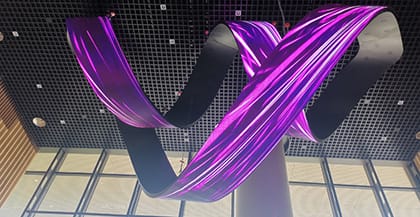
Imagine a massive spiral LED installation in a shopping mall. Each panel performs consistently, creating a flawless visual flow from top to bottom.

Custom Shapes for Creative Designs

One of the most appealing aspects of flexible LED screens is the ability to shape them according to design needs:

  • Cylinder Displays: Wrap around pillars or stage props.

  • Curved Facades: Follow architectural lines on buildings or exhibition booths.

  • Spiral Installations: Create dynamic, 3D visual experiences that draw attention.

By customizing the shape, brands can maximize engagement, turning ordinary spaces into immersive visual experiences.

flexible LED display screen

Durability: IP66 Waterproof and Outdoor Ready

Outdoor installations require screens that withstand extreme conditions. Meiyad flexible LED panels are rated IP66, ensuring:

  • Complete Dust Protection

  • Resistance to Water Spray and Strong Waves

  • Reliable Performance in Extreme Climates

Large-Angle Bending for Maximum Creativity

Meiyad’s flexible panels support large-angle bending, with a maximum bending arc exceeding 120°. This allows:

  • Wrap-around LED displays on columns or irregular structures

  • Curved stage designs that fully immerse audiences

  • Dynamic, multi-dimensional installations for exhibitions and retail windows

Such design flexibility allows brands to create displays that are not only visually impressive but also structurally adaptable.

flexible LED screen supplier

Key Considerations When Choosing a Flexible LED Screen

To select the right solution, consider:

  1. Module Reliability: Ensure high-quality materials and fireproof design.

  2. Customization Options: Check if the flexible LED screen supplier can deliver your desired shapes.

  3. Weather Resistance: Look for IP-rated panels for outdoor use.

  4. Bending Capacity: Determine the maximum angle to fit complex structures.

  5. Supplier Credibility: Partner with an established LED display manufacturer like Meiyad for support and quality assurance.

Applications That Showcase Flexibility

  • Concerts and Stages: Create curved backdrops and immersive environments.

  • Retail and Shopping Malls: Use transparent flexible screens to enhance atriums or window displays.

  • Trade Shows and Exhibitions: Modular panels allow quick setup and transport.

  • Architecture: Integrate LED screens into building facades or interior walls.

  • Sports Arenas: Large-scale displays without heavy structural load.

Why Meiyad Stands Out

As a leading LED display manufacturer, Meiyad provides:

  • High-Quality Flexible LED Panels: Reliable modules for consistent performance

  • Customizable Solutions: Curved, spiral, or cylindrical designs tailored to your project

  • Durability: IP66 waterproof rating and fireproof construction

  • Innovative Design: Supports large-angle bending for creative installations

  • Expert Support: Guidance from concept to installation

With Meiyad, businesses gain the flexibility, reliability, and performance needed to deliver professional, high-impact displays.

Conclusion:

A flexible LED display screen is not just a display—it’s a tool for innovation. From immersive stage backdrops to transparent architectural installations, these screens offer unmatched creative freedom. By choosing a trusted flexible LED screen supplier like Meiyad, you get high-quality flexible LED panels that are reliable, durable, and versatile. Whether it’s for concerts, retail spaces, exhibitions, or outdoor events, Meiyad ensures your installation delivers stunning visuals, adapts to unique designs, and withstands challenging environments—making your digital display vision a reality.

You May Also Like

Meiyad Continues to Shine on Day 2 of SEAMEX 2026 in Malaysia

22|05|2026

Meiyad Continues to Shine on Day 2 of SEAMEX 2026 in Malaysia

Today marks the second day of SEAMEX 2026 in Malaysia, and Meiyad continues to attract strong attention from visitors, partners, and industry professionals across Southeast Asia.At Booth A033, Meiyad is showcasing a wide range of innovative LED display solutions, including the high-end SK Rental LED Screen, COB LED displays, SMD LED displays, and GOB LED display technologies. These products demonstrate Meiyad’s professional capabilities in stage rental, commercial display, cultural tourism, and immersive audiovisual applications.Throughout the exhibition, Meiyad’s booth has welcomed many customers and industry partners who showed great interest in the outstanding visual performance, seamless display quality, and creative customization solutions of our LED displays. The event also provides an important platform for Meiyad to strengthen cooperation with Southeast Asian clients and further expand our presence in the regional market.As SEAMEX 2026 enters its final day tomorrow, Meiyad warmly welcomes more visitors to Booth A033 to explore our latest LED display technologies and discuss future cooperation opportunities.We sincerely appreciate the support and trust from all customers, partners, and visitors, and we look forward to creating more innovative audiovisual experiences together.Exhibition: SEAMEX 2026Booth: A033Location: Borneo Convention Centre Kuching, Malaysia

LED Display Screen Software Installation and Debugging Tutorial

20|05|2026

LED Display Screen Software Installation and Debugging Tutorial

Software Installation, Login & Screen ConfigurationDownload & InstallationOfficial website download:Visit NovaStar official website(www.novastar-led.cn or https://www.novastar.tech) → Support → Software Download, and download the latest version of NovaLCT (recommended v5.5.0 or above).Installation steps:I. Double-click the installation package.II. Use the default installation path.III. Complete installation.IIII. Disable antivirus software temporarily to avoid accidental blockingDevice ConnectionSynchronous System (Direct Network Cable Connection)Step 1: PC → Sending Card: Connect directly via USB cable; or Connect through the same LAN using network cable. (Default IP range: 192.168.0.xxx / 192.168.1.xxx)Step 2: Sending Card → Receiving Card: Cascade via network cables. Receiving card connects to the LED screen HUB board.Asynchronous System (WiFi Direct Connection)Step 1: Connect PC/mobile phone to the player box WiFi (Default SSID: AP + last 8 digits of SN, Password can be found on the device label); or connect through the same LAN.Step 2: Connect the player box to the HUB board (receiving card) and power on.Software LoginStep 1: Open NovaLCT,Click Login→Advanced Synchronous Login,Default password:666 or admin.Step 2: Successful connection message: "Control System 1, No Display Screen"; If connection fails, check wiring and check power supply.Smart ConfigurationStep 1: After login, enter Screen Configuration → Smart Settings.Step 2: Select Chip model, Decoding method, Module size (e.g. 172x86), click Next stepStep 3: Follow the screen instructions: Bright line direction→Color matching→Pixel-by-pixel calibration, generate configuration file (.scfg).Step 4: Click Send to apply parameters to the receiving card.Manual ConfigurationStep 1: Receiving Card Parameters: Enter Receiving Card → Port Configuration → Set width, height, number of data groups, and scan mode (e.g. 1/32 scan).Step 2: Sending Card Resolution: Enter Sending Card → Output Resolution → Enter actual screen resolution (e.g. 1920×1080) → Enable scaling → Click Send.Step 3: Load Configuration File: Supports local (.scfg/.zip) or cloud configuration files. Allows quick parameter reuse. [__LINK_ICON].Program Creation & Publishing (Asynchronous System)Pingjl Installation & OperationStep 1: Download Pingjl from the official website. Double-click the installation file and follow the Pingjl. After first launch, select "Asynchronous Playback" mode. Click "Start Now".Step 2: Open Pingjl and add devices: (Search LAN/WiFi devices, Default password: admin).Step 3: Create a new program: Program Management → New Program. Set resolution matching the screen.Step 4: Add media: Support Add media, Videos (MP4/AVI), Text, Clock, Weather forecast.Step 5: Edit attributes: Playback duration, Transition effects, Loop mode, Multi-layer overlay supported.Program PublishingStep 1: Select the program→Click Publish→Select target terminal→Confirm sending.Step 2: After successful publishing, the player box automatically loads and plays the program. If publishing fails, check network connection→Check device storage.Device Management, Maintenance & Firmware UpgradeFirmware UpgradeEnter Program Upgrade→Connect to the Internet, Select cloud upgrade, Choose corresponding sending card / receiving card firmware, Wait for completion, Do not power off during upgrade.Offline Upgrade:Import local firmware package (.bin), batch upgrade devices:Step 1: Login through "Login → Advanced Synchronous Login",enter password admin or 666. (For asynchronous products (JT/TB series), select Media Player Login)Step 2: Type "admin"or "666888" on the main interface.Step 3: Select communication port. If you need to reconnect the sending card, click "Reconnect".Step 4: Select the range to view, click "Refresh" to view the current software version of the hardware.Refresh All: View all sending/receiving card versions.Specified Refresh: View the software versions of the specified sending and receiving cards.PS: Simply click "Refresh All" on the screen to view the receriving card model and firmware version.Identifying Driver & Decoder Chips:Please refer to the information on the back of the module or on the packaging (you may also contact the relevant project manager for confirmation)Check IC markings on the back of the moduleObtain information according to the correct configuration file provided by the manufacturer:Step 1: In the "Screen Configuration" dialog box on the main LCT interface, select the "Receiving Card" tab.Step 2: Load the correct configuration file provided by the screen manufacturer from the local computer:a. Click "Load from Local";b. Select the configuration file and click "Open";c. After the file is successfully loaded, click "OK".Step 3: Click "View Cabinet" to check the information in the pop-up dialog box.Obtain the Corresponding Correct Firmware Program:You can directly access the public resources through the following links:Novastar Database http://gts.novastar.tech:6150/sharing/oLGDYny5ENovastar Overseas Database http://gts.novastar.tech:6150/sharing/CZRitU08hStep 1: Directly access the Nova database mentioned above.Step 2: From the homepage, follow the path:"Firmware Program > Receiving Card”to enter the receiving card model classification page.Step 3: According to the Nova receiving card model confirmed above, enter the corresponding receiving card page. The following examples use DH-LCE7516 / FS-LCE7516 / MRV416.Step 4: According to the confirmed driver IC and decoder IC used on the module, search for the corresponding firmware in the order of 1, 2, 3, and 5.(Option 4 is firmware for the 99-series chips, and 99-series chips can be searched directly.)OverviewUsing the example above, each folder contains the corresponding firmware and descriptions of the supported chips. You can check the descriptions to identify the driver IC and decoder IC used on your module, and then determine which firmware should be used.Based on the confirmed Nova receiving card model and the driver/decoder ICs used on the LED module, you can find the correct corresponding firmware.Screen MonitoringMonitoring → Device Status:Check temperature, voltage, network cable connection, signal source, and abnormal alarm notifications.Preset Screen: Tools → Preset Screen SettingsSet the display image when the signal is lost or disconnected (such as black screen or fixed logo).TroubleshootingUnable to connect to the deviceCheck USB/network cable, power supply, and IP segment; disable the firewall.Screen garbled/flickeringVerify receiving card parameters, network cable quality, and HUB board (receiving card) wiring; resend the configuration.Program playback abnormalCheck media format and resolution compatibility; restart the player box or republish the program.

Send Your Inquiry Today

Factory Direct LED Screen - Fast Quote, Best Price!

Please enter your company name
Please accept the data protection information

I have read and understood the  data protection   information.